
Client onboarding is where a signed deal turns into a working relationship, or where it stalls. Most agencies still run it the same way: a checklist edited by hand for each client, credentials chased over email, an account manager assembling the process before they can run the work. Emerjent removes that back-and-forth by auto-generating the action list and required-inputs list the moment a deal closes.
What Client Onboarding Actually Requires
A new client relationship needs a few things nailed down fast: signed scope, brand assets, platform access, and a clear point of contact. Miss one and the first two weeks of the engagement go to tracking it down instead of doing the work you were hired for. Requirements shift by client too: an ecommerce brand needs a Shopify login, a B2B software client needs HubSpot access and a target account list, a local service business needs a Google Business Profile login. One generic checklist can't hold all three without turning into a document nobody reads past line five.
Why the Manual Checklist Breaks Down at Scale
One client onboarding on a shared doc or a Trello board works fine. The problem shows up at three, five, ten clients running onboarding at once. Someone has to remember which checklist template applies, copy it, edit it by hand for the specifics of that client, then track who's sent what.
Credentials make it worse. Passwords land in email threads, in Slack DMs, in whatever channel was open when the client happened to think of it. That's slow, it's easy to lose track of, and it's not exactly a great security habit. Every agency that's grown past a couple of clients has a story about a login that got buried in someone's inbox for two weeks.
How Emerjent Auto-Generates the Action List for Every New Client
Emerjent auto-generates the action list from the deal record itself, the moment a deal closes. No template to pull up, no editing a generic checklist down to size. The list reflects what that specific client and engagement need: the deal's industry, engagement type, and contract terms feed the generation directly.
Because Emerjent runs on top of the CRM you're already using, the action list ties straight back to the deal and client record already there. The client's name, scope, and contact details carry over automatically. The account manager opens a list that's already built and starts working it.
A Step-by-Step Walkthrough: From Closed Deal to Working Session
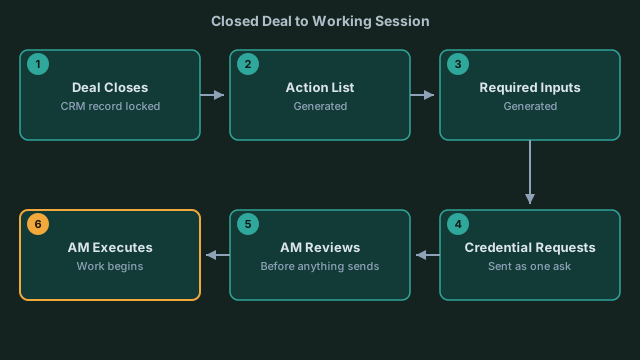 From closed deal to working session: five automated handoffs, one human review.
Here's what actually happens, in order, once a deal moves to closed-won:
- The deal record closes. Whatever's already in the CRM, scope notes, deal size, industry tags, contract terms, is the input. There's no separate onboarding form to fill out first.
- Emerjent generates the action list from that record. It reads what kind of engagement this is (paid media, RevOps buildout, retained content, whatever the scope says) and builds a task list scoped to that engagement type, not a generic one-size-fits-all template.
- The required-inputs list generates alongside it. This is the list of what you need from the client: brand assets, platform access, existing reporting, whatever that engagement type typically requires.
- Credential requests go out directly, tracked in one place. The client sees one clear ask with every credential itemized, sent as a single message rather than five separate emails over two weeks.
- The account manager reviews before anything sends. The list is generated, not blindly executed. A human still checks it makes sense for this specific client before the client sees anything.
- The account manager works the list. From here it's execution, checking off tasks as access comes in and assets land, instead of building the checklist as they go.
The generation happens fast enough that by the time a salesperson finishes the handoff call, the list already exists. That's the actual shift: the account manager's first move on a new client is executing a plan, not drafting one.
A Real Example, Not a Hypothetical
One of Emerjent's design-partner agencies runs a fractional AI leadership engagement. When Emerjent rebuilt that client's onboarding, it generated 13 steps automatically: info acknowledgments (confirm leadership stakeholders, confirm the pilot pod, align on weekly exec meeting timing), file uploads (branding assets, sales process docs, delivery process docs), access-grant actions (admin access to Claude, Fathom, and HubSpot), and secure credential intake (API keys for Anthropic and OpenAI).
None of those 13 steps came from a template someone edited by hand. They came directly from what that engagement required, generated the moment the deal closed, with the credential steps routed into secure intake instead of an email thread. The account manager reviewed a list that already existed, adjusted for what was specific to that client, and sent it. That's the scale problem solved: not a smaller checklist, a checklist that already reflects the engagement.
A Client Scenario: The B2B Software Onboarding
Say a B2B software company just signed on for a RevOps engagement. Under the old manual process, the account manager would start by pulling up a generic onboarding doc, deleting the ecommerce-specific lines about product feeds, adding lines about HubSpot access and target account lists, and emailing the client to ask for logins one at a time as they're remembered.
With Emerjent, the deal record already flags this as a B2B RevOps engagement. The generated action list reflects that: HubSpot admin access, a list of target accounts, existing pipeline reporting, whatever that engagement type calls for, instead of a checklist written for a different kind of client and then edited down. The required-inputs list and credential requests go out as one clear ask. The client's point of contact gets a single message that says exactly what's needed and where to send it, rather than three follow-up emails over ten days.
The client sees one clear ask instead of a week of follow-up emails. That's the impression that sticks in the first two weeks: competence, not scramble.
Collecting Required Inputs and Credentials Without the Back-and-Forth
Credential collection stops being five separate emails. Emerjent builds a required-inputs list automatically per client, requests everything at once, and tracks every response in one place. The day-one scramble, chasing a password over email, following up twice because the first request got buried, doesn't happen the same way. The client gets one clear, specific ask for what you need and where to send it.
That matters most in the first two weeks of an engagement, when a client is forming their opinion of whether hiring you was the right call. A clean, specific ask reads as competence. A scattered chain of one-more-thing emails reads the opposite, even when the work itself is solid.
Objection: Doesn't Every Client Need a Human Judgment Call Anyway?
No two clients are identical, and an auto-generated list won't capture every edge case on its own. It isn't meant to replace the account manager's judgment; it's built to remove the blank-page problem. The list is scoped to what's already in the deal record: industry, engagement type, contract terms. That gets a checklist to roughly 80% right for this specific client before a human ever sees it. The account manager still reviews it, still adjusts for whatever's unique, and still decides what goes to the client. What changes is the starting point: editing something that's already mostly right, instead of building from a blank document. That's the time savings, even with a person checking the work at every step.
What Changes for Your Agency
Emerjent generates the action list and the required-inputs list automatically, scoped to that client's deal record, the moment the deal closes. Your team executes instead of assembles. The process is already built by the time the client shows up, so attention goes to the engagement itself, not the paperwork behind it.