
Capacity planning means matching your team's available hours to the work you've committed to, and catching a staffing gap two to three weeks out instead of the day before a deadline. That's the whole concept. Most of the tools that explain it (Asana, monday.com, Runn) answer the question horizontally, for any team of any size in any industry. If you're running a 3 to 10-person agency or a solo consultancy, that horizontal answer doesn't tell you what to do on a Tuesday when a new SOW lands and you need to know, right now, whether you can staff it.
Capacity planning vs. capacity management
These get used interchangeably and they shouldn't be. Capacity planning is the forecast: here's what's coming, here's what we have, here's where it doesn't line up. Capacity management is what you do about it week to week, reassigning hours, shifting a deadline, pulling in a floater.
Most agencies fail in the gap between the two. They plan once at the start of a quarter, then manage reactively for the next twelve weeks with no updated forecast to check against. By the time the gap shows up, it's a missed deadline, not a Tuesday-morning heads-up.
Three types of capacity planning, and which ones agencies actually use
There are three recognized approaches: lead (add capacity ahead of demand), lag (add capacity after demand shows up), and match (adjust in small increments as demand shifts). Enterprise ops teams can afford to lead, hiring ahead of a forecast. A 3 to 10-person agency mostly can't. You're blending lead and match: hiring a little ahead when you can see it coming, and making small weekly adjustments (a floater here, a deadline shift there) the rest of the time.
Capacity by pod, capacity by individual contributor
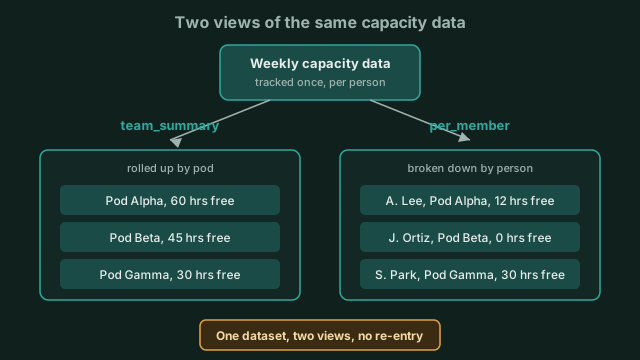 Same underlying capacity numbers, rolled up by pod or broken down by person, without re-entering data.
This is where it stops being a concept and starts being a number you can act on. Emerjent's capacity_plan tool gives you two views of the same data. team_summary rolls up weekly capacity per pod, so if you run in pods, you see each pod's total available hours without switching views. per_member breaks the same data down to the individual, with pod grouping included for context, so you can see who's at 100% and who has room, without losing the pod-level picture.
Matching roles to demand before you're short
A capacity number by itself doesn't tell you if you have the right kind of capacity. role_demand rolls up your committed work by role, compares it against who you have, and flags any role nobody on the team holds. That's the difference between "we have enough hours" and "we have enough hours, but none of them belong to a strategist."
Knowing if a deal is staffable before you sign it
Before a new deal becomes a commitment, deal_coverage checks it against your team: staffability by role, a coverage percentage, and a gap reason for anything that isn't covered, either no_role_holder (nobody on the team can do this role at all) or insufficient_capacity (someone can, but not enough hours are free). You get that answer before the contract's signed, not after.
Seeing the whole pipeline's staffing risk, not just one deal
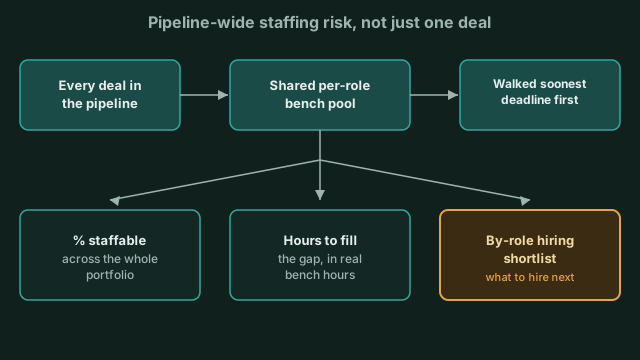 One shared bench pool, walked deadline first, turns pipeline-wide risk into a hiring shortlist.
Checking one deal at a time misses conflicts building up across the rest of your pipeline. pipeline_outlook closes that gap: it takes every qualifying deal in your pipeline and walks a single shared per-role bench pool against it, soonest deadline first, the way real staffing conflicts actually play out. It returns a percent-staffable figure for the portfolio, hours-to-fill, and a by-role hiring shopping list, so you know which role to hire for next, not just that you're generally stretched.
Finding the best-fit pod for a new deal
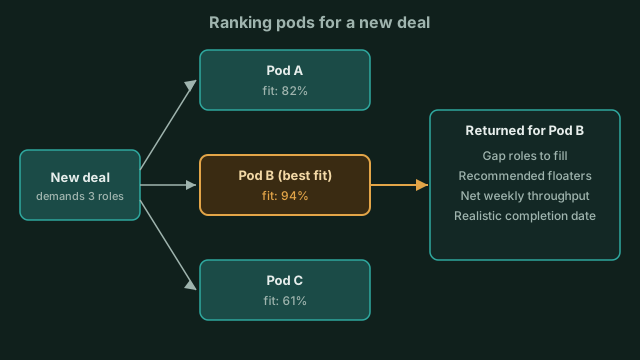 pod_fit ranks pods by coverage and returns the best-fit pod's gaps, floaters, and a capacity-realistic completion date.
If you run multiple pods, the question isn't just "can we staff this" but "who should staff this." pod_fit ranks your pods by how well each one covers a deal's demanded roles and available capacity, then returns the best-fit pod's gap roles, recommended floaters to fill them, net weekly throughput, and a capacity-realistic implied completion date, one that accounts for what the pod actually has free, not what the SOW hopes for.
Keeping the numbers current
None of this holds up if the underlying hours are stale. update_capacity lets you set weekly hours and a per-day breakdown for anyone on the team, or create a date-range override for something like a vacation week. Capacity planning is only as good as the last time someone updated it, so this is the step that keeps the rest of the picture honest.
A hypothetical worked example
Say you run a 3-person team, each person billable for roughly 30 hours a week, 90 billable hours total for the week. A new project comes in that needs 110 hours of work in that same window. Run team_summary and you see the 90-hour ceiling immediately. Run role_demand against the new project's committed hours and you see the 20-hour gap by role, before the kickoff call, not during it. That's the entire value of capacity planning in one sentence: the gap shows up on a screen instead of in a missed deadline.
FAQ
What is capacity planning? Capacity planning is the process of matching your team's available working hours against the work you've committed to, so you can forecast staffing gaps ahead of time instead of discovering them at a deadline.
What's the difference between capacity planning and capacity management? Capacity planning is the forecast, done at intervals. Capacity management is the ongoing, week-to-week adjustment (reassigning hours, pulling in floaters, shifting deadlines) based on that forecast.
What are the types of capacity planning? Three recognized types: lead (build capacity ahead of demand), lag (add capacity after demand appears), and match (small, incremental adjustments as demand shifts). Small agencies typically blend lead and match rather than relying on either alone.
What does resource capacity planning look like for a small agency? For a 3 to 10-person team, it isn't about hiring plans three quarters out; it's about knowing, deal by deal and week by week, whether you have the right roles free at the right hours. That means checking capacity by pod, by individual, and by role, not just by total headcount.
Can Emerjent tell me if a deal is staffable before I sign it? Yes. The deal_coverage capability checks a specific deal's role requirements against your team's current capacity and returns a coverage percentage plus the reason for any gap, before you've committed to the work.