Field notes
How to tell an AI rollout is working: listen to the questions
Usage dashboards won't tell you if an AI rollout is working. The real signal is in the questions people ask, and the way those questions change shape over three months.
Last updated Sep 12, 2026
How to tell an AI rollout is working: listen to the questions
About twenty minutes into the first hands-on training session, one of the operators stopped me.
"Every time you said we're chatting, you meant we're chatting in Claude. We're not chatting in Emerjent."
She was right, and I had not said it clearly once. The whole thesis of the product is that you work in conversation and the system holds the result, which means there's no window to type into. I had built something whose main interface is an absence, and I'd been describing it for twenty minutes as though that were obvious.
Two months later, the same team asked me whether each user acceptance test item could be tied back to a specific requirement, which is tied to a specific goal, so that a client signing off on a test is also signing off on the thing we promised to build.
Nothing in my usage data captured the distance between those two questions. That distance is the only adoption signal I actually trust now.
If you want to know whether an AI rollout is working, stop looking at logins and hours saved, and pay attention to what people ask you. The questions change shape in a specific order, and the order tells you where you are.
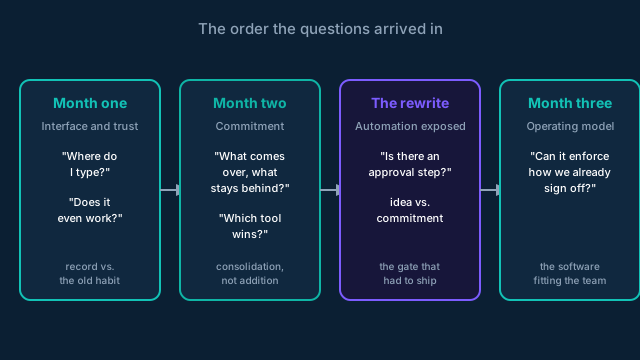 The order the questions arrived in, not the order anyone planned.
Month one: where am I, and can it even do that
The first month of questions were all about the interface. Not "how do I use this feature" but "what am I looking at."
→ Where do I type → If I'm looking for something, how do I know where to look → Do I call a specific agent, or does it just know → When my colleague finishes a task, does she tell me in Slack or in here
That last one is the question that quietly kills rollouts. Every team already has a working system, usually a group chat and a shared doc and somebody's memory. If nobody decides which system is the record for which kind of work, people do both, get tired of doing both, and go back to the one that was already there. It has to be an explicit decision in the first session, written down. A default won't hold.
The other pattern I didn't expect: people don't believe the thing will work. One operator said she'd asked a chat tool to save something before and gotten the equivalent of a polite shrug. She wasn't skeptical of my product specifically. She'd been trained by two years of chatbots that the answer to "can you remember this" is no. You can't talk someone out of that. You have to make them watch you save something and then pull it back out, once, live.
The most useful question of the whole month came from their sales-side consultant, who asked whether it was reasonable to assume this would be harder before it got easier. Yes. The first couple of weeks you're teaching the system how you work, and that's real work with no payoff yet. Saying so out loud bought more goodwill than any feature I shipped that month.
Month two: what are we willing to leave behind
By August the questions stopped being about the interface and started being about commitment, which is a much more expensive category.
The team decided to move off their existing project tool by the end of the month. That turned into a series of questions I couldn't answer with a demo. What comes over and what stays? Answer: active clients and live projects only, with history archived where it can still be reported on. Trying to bring five years of closed work into a new system is how a migration becomes a six-month project nobody finishes.
Then the harder one. They were already running one AI tool for knowledge retrieval and were now being asked to run another. Which one wins? They tested both against real client documents and picked based on which one got the details right and held context across a conversation. Accuracy is what produced trust, and trust is what made them willing to stop splitting their attention between two tools. Fragmented AI is worse than one AI, because you never build the habit.
I also made a call this month that I got wrong, which brings me to the interesting part.
The question that rewrote my roadmap
In the August session I demoed automatic task creation from meeting transcripts. The system listens to a client call, pulls out the follow-ups, and writes them into the project. Someone asked whether there was an approval step. I said no, and that we could add one later if task noise ever became a problem.
Four weeks later their delivery lead told me the automation made him anxious. Not because it was inaccurate. Because it was accurate, and a client saying "we might want that someday" in the middle of a call was now producing a real task on a real project with real hours attached to it.
The feature was doing exactly what I built it to do, and that was the problem. I'd automated the capture of intent without automating the distinction between an idea and a commitment. Scope creep used to require somebody to write it down, and that small act of friction was doing more work than anyone realized.
So the approval gate shipped, and it isn't a toggle I bolted on. It's a screen between the meeting and the project where suggested tasks and decisions sit until a human accepts, edits, defers them to a later sprint, or drops them in the backlog.
Every automation you ship creates a new class of mistake. You don't find it by thinking harder. You find it by watching someone who has to live with the consequences use it on a real client for a month.
Month three: make it work the way we work
By September the questions had changed category again. They were no longer about whether the system worked. They were about making it match how the team actually delivers.
Their PM wanted a mechanism for sign-off on everything promised in a project, not just on test cases. Her line was that she wanted a mechanism, not just a verbal. She wanted clients to see the decisions made in meetings, because decisions get forgotten and then relitigated. She wanted to run every client standup inside the tool: progress, open action items, decisions that affect scope, what's in this sprint and what's in the backlog.
Their delivery lead wanted something else. He pointed out that hours burned doesn't tell you whether a project is healthy. If you're six weeks into twelve and 30% complete, the hours are almost beside the point. He wanted percent complete against timeline, because that's the number you can actually put in front of a client when you're negotiating what moves.
None of that is a feature request. It's a team describing their own operating model and asking whether the software can hold it. That's the thing I was listening for the whole time.
What this doesn't tell you
I want to be careful not to make this sound tidier than it is.
The client-facing portal still isn't cleared for their newest project, because branding and a custom domain aren't finished on my end. Their PM told me on the last call that if it isn't ready she'll build a spreadsheet of the client-facing information and run the project out of that. She's right to do it, and it's the most useful thing anyone said to me all month. When your last mile isn't ready, people route around you, and the workaround becomes the habit. Whatever she builds this week is what she'll still be using in November unless I move fast.
I also pitched a scoring matrix for helping clients weigh wish-list items by effort against impact. Their consultant said no. Her reasoning was that she often doesn't have the context to know what makes something hard, and a two-axis chart would flatten exactly the part that matters. She was right, and the PM redirected to something better: flag scope-affecting items inside the decisions log and work through them live on the standup. That's a smaller feature and a more useful one.
An operator declining to let you systematize her judgment is not resistance. It's the most accurate design feedback you can get, and you only get it from someone who's used the thing long enough to know where its edges should be.
If you're running a pilot
Write down the questions. Not the bug reports, the questions. Once a month, read the last month's worth next to the first month's.
If they still sound like month one, the rollout hasn't started yet, whatever your usage numbers say. If they've moved from "where do I type" to "can it enforce the way we already do sign-offs," the thing is working, and the roadmap you need is being handed to you in the form of questions you can't answer yet.